
|
Größe: 8469
Kommentar:
|
Größe: 8448
Kommentar:
|
| Gelöschter Text ist auf diese Art markiert. | Hinzugefügter Text ist auf diese Art markiert. |
| Zeile 8: | Zeile 8: |
| == Oberseite == | == Top Side== |
| Zeile 11: | Zeile 11: |
| === Molex-Buchse zum Anschluss an die Verteilerplatine === 1 - Molex Buchse . Belegung von oben nach unten:<<BR>> 1 - +12V <<BR>> 2 - I2C Bus (C)<<BR>> 3 - I2C Bus (D)<<BR>> 4 - + Summer<<BR>> 5 - Masse (FC und Summer)<<BR>><<BR>> |
=== Molex-Connector to connect to power distribution board === 1 - Molex Connector . Connections from top to bottom:<<BR>> 1 - +12V <<BR>> 2 - I2C Bus (C)<<BR>> 3 - I2C Bus (D)<<BR>> 4 - + Buzzer<<BR>> 5 -Ground (GND FC and Buzzer)<<BR>><<BR>> |
| Zeile 17: | Zeile 17: |
| * [[https://www.mikrocontroller.com/index.php?main_page=product_info&cPath=88&products_id=502|passende Molex-Buchse im Shop]] * [[https://www.mikrocontroller.com/index.php?main_page=product_info&products_id=318|passendes Kabel im Shop]] |
* [[https://www.mikrocontroller.com/index.php?main_page=product_info&cPath=88&products_id=502|suitable connector for the Molex cable]] * [[https://www.mikrocontroller.com/index.php?main_page=product_info&products_id=318|suitable Molex cable]] |
| Zeile 20: | Zeile 20: |
| Bei Verwendung dieses Kabels kann kein Schalter auf der FC zum Einsatz kommen. Der MK wird dann durch Einstecken des Lipos eingeschaltet (das ist bei mehr als 4 Motoren ohnehin üblich) | If you are using this new connection you will be unable to install a power switch for your Flight Controller. The Mikrokopter will then get turned on by connecting your Lipo battery. (All MK with more than 4 engines do that anyways). |
| Zeile 22: | Zeile 22: |
| == Unterseite == | == Bottom Side== |
| Zeile 25: | Zeile 25: |
| 1 - 10pol Anschlussleiste (MK-USB oder zur NaviCtrl)<<BR>> 2 - Höhenregler (Auskerbung am Sensorbein zeigt nach rechts)<<BR>> 3 - 6pol Anschlussleiste (Servo2 / Servo3)<<BR>> 4 - 6pol Anschlussleiste (Servo4 / Servo5)<<BR>> 5 - DC/DC Wandler 5V Recom (Versorgung FC ME)<<BR>> 6 - DC/DC Wandler 5V Recom (Versorgung Servos)<<BR>> 7 - 6pol Anschlussleiste (zur NaviCtrl)<<BR>> 8 - 6pol Anschlussleiste (Servo1 / Schaltausgänge J16/J17)<<BR>> 9 - I2C Anschluss (D/C) für BL-Ctrl.<<BR>> 10 - JET (bei Verwendung eines Jeti Empfängers mit Datenkanal hier Lötbrücke legen)<<BR>> 11 - Anschlussleiste (5V, G, 3V, RX, TX) | 1 - 10pin connector for MK-USB or NaviCtrl connection<<BR>> 2 - Pressure Sensor (cut out of sensor connector points to the right)<<BR>> 3 - 6pin connector for servo 2 and Servo 3<<BR>> 4 - 6pin connector for servo 4 and servo 5<<BR>> 5 - DC/DC voltage regulator 5v Recom for Flight Controller<<BR>> 6 - DC/DC voltage regulator 5v Recom for servos<<BR>> 7 - 6pin connector for NaviCtrl<<BR>> 8 - 6pin connector for servo 1 and switchable J16/J17 connectors<<BR>> 9 - I2C connector (C/D) for BL Controllers<<BR>> 10 - JET (If you are using the Jeti Satellite receiver you will have to bridge these two connectors)<<BR>> 11 - 5pin connector (5V, GND, 3V, RX,TX) |
| Zeile 27: | Zeile 27: |
| . '''Anschluss eines Jeti Empfängers:''' . das PPM Anschlusskabel an "Punkt 13" anlöten, "JET" mit einer Lötbrücke versehen und zusätzlich den Datenkanal an "RX" anschließen.<<BR>> '''Anschluss eines Spectrum Empfängers''': . Spectrum Empfänger Kabel der Farbe nach an Orange-3V, Schwarz-G, Grau-RX anlöten.<<BR>> |
. '''Connection for Jeti receiver:''' . Connect PPM cable to #13, bridge the 2 connectors on #10 and connect RX<<BR>> '''Connection for Spektrum Satellite:''': . Connect the orange Receiver cable on 3V, black to G and gray to RX<<BR>> |
| Zeile 32: | Zeile 32: |
| 12 - Anschluss Summer (BUZ-/BUZ+)<<BR>> 13 - Anschluss PPM Empfänger (GN-Braun, +5-Rot, PPM-Orange)<<BR>> 14 - Minus Anschluss Spannungsversorgung<<BR>> 15 - Plus Anschluss Spannungsversorgung (bei Verwendung eines Schalters)<<BR>> 16 - Plus Anschluss Spannungsversorgung (direkter Anschluss ohne Schalter)<<BR>> | 12 - connection for the buzzer (BUZ-/BUZ+)<<BR>> 13 - Connection for PPM receiver (GN-brown, +5V-red, PPM-orange)<<BR>> 14 - Ground (GND) connection for the Flight Controller<<BR>> 15 - Positive (+) connection for the Flight Controller (if a power switch is being used)<<BR>> 16 - Positive (+) connection for the Flight Controller (without a power switch)<<BR>> |
| Zeile 34: | Zeile 34: |
| [[FlightCtrl_ME_2_0#Anschl.2BAPw-sse|weitere Infos auf FC2.0]] | [[FlightCtrl_ME_2_0#Anschl.2BAPw-sse|also see info on FC2.0]] |
| Zeile 36: | Zeile 36: |
| = Anschlüsse = | = Connections = |
| Zeile 39: | Zeile 39: |
| (bis auf die weisse Molex-Buchse ist die FC2.1 von den Steckanschlüssen identisch mit der FC2.0) | (FC2.1 and FC2.0 are identical except the new Molex Connector) |
| Zeile 41: | Zeile 41: |
| == Anschlüsse SV2 == '''Obere Reihe (Schaltausgänge)''' |
== Connectors SV2 == '''Upper Row (switchable outputs)''' |
| Zeile 44: | Zeile 44: |
| Pin1: 100mA Schaltausgang NPN Open Collector z.B. für LEDs. Im Koptertool [[MK-Parameter/Output|programmierbar]] mit J16. | Pin1: 100mA switchable output with NON Open Collector for LED's, Programmable with MK Koptertool with J16. |
| Zeile 48: | Zeile 48: |
| Pin5: 100mA Schaltausgang NPN Open Collector z.B. für LEDs. Im Koptertool [[MK-Parameter/Output|programmierbar]] mit J17. | Pin5: 100mA switchable output with NON Open Collector for LED's, Programmable with MK Koptertool with J17. |
| Zeile 50: | Zeile 50: |
| '''Untere Reihe: Nick-Servo Ausgang''' | '''Lower row: Nick-Servo Output''' |
| Zeile 52: | Zeile 52: |
| Pin2: Servo1 Ausgang (für Nick-Servo der Kamerastabilisierung) ([[MK-Parameter/Camera|Setting im Koptertool]]) | Pin2: Servo 1 output (for Nick-Servo camera stabilization)(adjustable via MK Koptertool) |
| Zeile 54: | Zeile 54: |
| Pin4: +5 Volt (Recom IC3 muss bestückt werden) | Pin4: +5V (only applicable if you installed a Recom on IC3) |
| Zeile 56: | Zeile 56: |
| Pin6: GND / Minus | Pin6: GND |
| Zeile 60: | Zeile 60: |
| == Anschlüsse SV3 == '''Obere Reihe (Servo 3)''' |
== Connectors SV3 == '''Upper row: Servo 3''' |
| Zeile 63: | Zeile 63: |
| Pin1: Servo3 Ausgang | Pin1: Servo 3 output |
| Zeile 65: | Zeile 65: |
| Pin3: +5 Volt (Recom IC3 muss bestückt werden) | Pin3: +5V (only applicable if you installed a Recom on IC3) |
| Zeile 67: | Zeile 67: |
| Pin5: GND / Minus | Pin5: GND |
| Zeile 69: | Zeile 69: |
| '''Untere Reihe: Roll-Servo Ausgang''' | '''Lower Row: Roll-Servo Output''' |
| Zeile 71: | Zeile 71: |
| Pin2: Servo2 Ausgang ([[MK-Parameter/Camera|Setting im Koptertool]]) | Pin2: Servo 2 Output ([[MK-Parameter/Camera|Setting in Koptertool]]) |
| Zeile 73: | Zeile 73: |
| Pin4: +5 Volt (Recom IC3 muss bestückt werden) | Pin4: +5V (only applicable if you installed a Recom on IC3) |
| Zeile 75: | Zeile 75: |
| Pin6: GND / Minus | Pin6: GND |
| Zeile 77: | Zeile 77: |
| == Anschlüsse SV4 == '''Obere Reihe (Servo 5)''' |
== Connectors SV4 == '''Upper row: Servo 5''' |
| Zeile 80: | Zeile 80: |
| Pin1: Servo5 Ausgang | Pin1: Servo 5 output |
| Zeile 82: | Zeile 82: |
| Pin3: +5 Volt (Recom IC3 muss bestückt werden) | Pin3: +5V (only applicable if you installed a Recom on IC3) |
| Zeile 84: | Zeile 84: |
| Pin5: GND / Minus | Pin5: GND |
| Zeile 86: | Zeile 86: |
| '''Untere Reihe: (Servo 4)''' | '''Lower Row: Servo 4''' |
| Zeile 88: | Zeile 88: |
| Pin2: Servo5 Ausgang | Pin2: Servo 4 output |
| Zeile 90: | Zeile 90: |
| Pin4: +5 Volt (IC3 muss bestückt werden) | Pin4: +5V (only applicable if you installed a Recom on IC3) |
| Zeile 92: | Zeile 92: |
| Pin6: GND / Minus | Pin6: GND |
 Page in
  Page en
 siehe auch: FlightCtrl_ME_2_0
Inhaltsverzeichnis
Flight Ctrl V2.1
== Top Side== 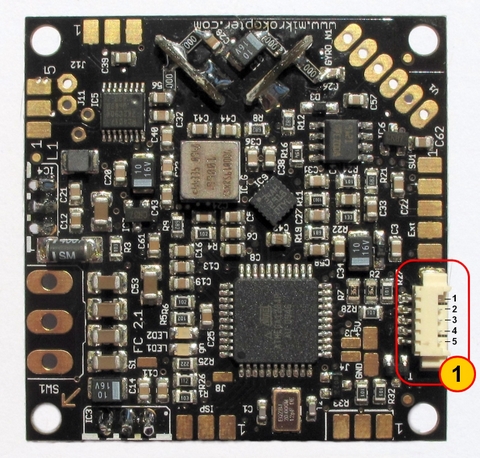
Molex-Connector to connect to power distribution board
1 - Molex Connector
Connections from top to bottom:
1 - +12V
2 - I2C Bus (C)
3 - I2C Bus (D)
4 - + Buzzer
5 -Ground (GND FC and Buzzer)

If you are using this new connection you will be unable to install a power switch for your Flight Controller. The Mikrokopter will then get turned on by connecting your Lipo battery. (All MK with more than 4 engines do that anyways).
== Bottom Side== 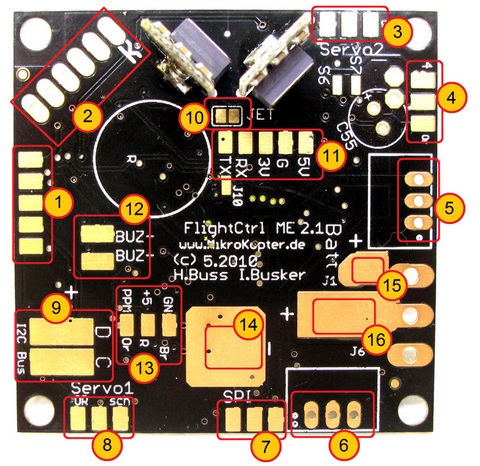
1 - 10pin connector for MK-USB or NaviCtrl connection
2 - Pressure Sensor (cut out of sensor connector points to the right)
3 - 6pin connector for servo 2 and Servo 3
4 - 6pin connector for servo 4 and servo 5
5 - DC/DC voltage regulator 5v Recom for Flight Controller
6 - DC/DC voltage regulator 5v Recom for servos
7 - 6pin connector for NaviCtrl
8 - 6pin connector for servo 1 and switchable J16/J17 connectors
9 - I2C connector (C/D) for BL Controllers
10 - JET (If you are using the Jeti Satellite receiver you will have to bridge these two connectors)
11 - 5pin connector (5V, GND, 3V, RX,TX)
Connection for Jeti receiver:
Connect PPM cable to #13, bridge the 2 connectors on #10 and connect RX
Connection for Spektrum Satellite::
Connect the orange Receiver cable on 3V, black to G and gray to RX
12 - connection for the buzzer (BUZ-/BUZ+)
13 - Connection for PPM receiver (GN-brown, +5V-red, PPM-orange)
14 - Ground (GND) connection for the Flight Controller
15 - Positive (+) connection for the Flight Controller (if a power switch is being used)
16 - Positive (+) connection for the Flight Controller (without a power switch)
Connections

(FC2.1 and FC2.0 are identical except the new Molex Connector)
Connectors SV2
Upper Row (switchable outputs)
Pin1: 100mA switchable output with NON Open Collector for LED's, Programmable with MK Koptertool with J16.
Pin3: +5 Volt
Pin5: 100mA switchable output with NON Open Collector for LED's, Programmable with MK Koptertool with J17.
Lower row: Nick-Servo Output
Pin2: Servo 1 output (for Nick-Servo camera stabilization)(adjustable via MK Koptertool)
Pin4: +5V (only applicable if you installed a Recom on IC3)
Pin6: GND
Hinweis: die Servoausgänge werden erst aktiviert, nachdem die Gyros kalibriert wurden (Gas/Gier-Knüppel so lange in die obere linke Ecke drücken, bis der Summer piepst und die grüne LED erlischt).
Connectors SV3
Upper row: Servo 3
Pin1: Servo 3 output
Pin3: +5V (only applicable if you installed a Recom on IC3)
Pin5: GND
Lower Row: Roll-Servo Output
Pin2: Servo 2 Output (Setting in Koptertool)
Pin4: +5V (only applicable if you installed a Recom on IC3)
Pin6: GND
Connectors SV4
Upper row: Servo 5
Pin1: Servo 5 output
Pin3: +5V (only applicable if you installed a Recom on IC3)
Pin5: GND
Lower Row: Servo 4
Pin2: Servo 4 output
Pin4: +5V (only applicable if you installed a Recom on IC3)
Pin6: GND
Empfängeranschlüsse
Standard PPM-Empfänger
z.B.
Anschluss:
- Schwarz an "GN" (Minus)
- Orange an "+5" (Plus)
- Orange an "PPM" (Datenleitung)


Spektrum Satellitenempfänger
Der 3,0V-Anschluss und der Datenanschluss RxD für diesen Empfänger sind auf der Unterseite vorgesehen.
Anschluss:
- Schwarz an "G" (Minus)
- Orange an "3V" (Plus)
- Grau an "RX" (Datenleitung)
- Lötjumper "JET" Offen


Siehe auch: Spektrum
Jeti Satellitenempfänger
Die externe Diode ist ab der FC-Version 2.1 bereits integriert, muss hier also nicht mehr von außen angelötet werden.
Anschluss:
- Schwarz an "GN" (Minus)
- Orange an "+5" (Plus)
- Orange an "PPM" (PPM-Datenleitung)
- Lötjumper "JET" gebrückt
- Separate Datenleitung (Jeti-Rückkanal) von "RX" an "D" des Jeti-Empfängers (äußerer Anschluss)


Siehe auch: JetiDuplex
Schaltplan
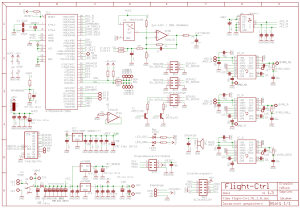
 Die Benutzung der MikroKopter-Software ist nur auf originaler Hardware erlaubt.
Hardware-Änderungen zur Version V2.0
- Controller mit doppelt so viel Flash-Speicher (ATMEGA1284P)
- Molex-Stecker für einfachen Anschluss an die Stromverteilerplatinen
- eigener Spannungsregler für z.B. Spektrum Satelliten Empfänger
Löt-Jumper für die Verwendung vom Jeti Rückkanal (für die JetiBox)
- Widerstandsanpassung für den Luftdrucksensor. Messbereich jetzt (je nach Wetterlage): bis ca. 2000-3000m
- Widerstandsanpassung I2C Pull-Ups.
- Schutzdiode in SPEAKER Ausgang eingefügt.
- Farbe jetzt schwarz
Änderung Lieferumfang der V2.1 (im Vergleich zur V2.0)
- Luftdrucksensor MPX4115A enthalten
jetzt 2 Spannungsregler (z.B. RECOM ö.ä.) enthalten (für FlightCtrl - Versorgung & Servo-Versorgung)
- Schalter ist nicht mehr enthalten und muss bei Bedarf separat bestellt werden
Sonstiges
- der Bootloader der FC2.1 ist nicht öffentlich und kann nicht ausgelesen werden - das haben wir den Chinesen zu verdanken
auf keinen Fall darf per ISP (mit Atmel-Programmern & co) das Programm neu eingespielt oder gelöscht werden