
|
Größe: 1951
Kommentar:
|
Größe: 8357
Kommentar:
|
| Gelöschter Text ist auf diese Art markiert. | Hinzugefügter Text ist auf diese Art markiert. |
| Zeile 3: | Zeile 3: |
| siehe auch: [[FlightCtrl_ME_2_0]] <<TableOfContents>> |
siehe auch: [[FlightCtrl_ME_2_0]] <<TableOfContents>> |
| Zeile 7: | Zeile 6: |
| Belegung/Beschaltung FC ME V2.1 | [[https://www.mikrocontroller.com/index.php?main_page=product_info&cPath=69|Shoplink]] |
| Zeile 9: | Zeile 8: |
| == Oberseite == | == Top Side== {{attachment:FC2-1-1.jpg}} |
| Zeile 11: | Zeile 11: |
| {{attachment:FlightCtrl_ME_2_1/FC2-1-1.jpg}} | === Molex-Connector to connect to power distribution board === 1 - Molex Connector . Connections from top to bottom:<<BR>> 1 - +12V <<BR>> 2 - I2C Bus (C)<<BR>> 3 - I2C Bus (D)<<BR>> 4 - + Buzzer<<BR>> 5 -Ground (GND FC and Buzzer)<<BR>><<BR>> |
| Zeile 13: | Zeile 15: |
| 01 - Molex-Buchse<<BR>> Belegung von oben nach unten:<<BR>> 1 - +12V <<BR>> 2 - I2C Bus (C)<<BR>> 3 - I2C Bus (D)<<BR>> 4 - + Summer<<BR>> 5 - Masse (FC und Summer)<<BR>><<BR>> |
[[http://gallery.mikrokopter.de/main.php/v/tech/FC21_+an_Verteiler.jpg.html|{{http://gallery.mikrokopter.de/main.php?g2_view=core.DownloadItem&g2_itemId=62767|http://gallery.mikrokopter.de/main.php/v/tech/FC21_+an_Verteiler.jpg.html}}]] |
| Zeile 21: | Zeile 17: |
| == Unterseite == | * [[https://www.mikrocontroller.com/index.php?main_page=product_info&cPath=88&products_id=502|suitable connector for the Molex cable]] * [[https://www.mikrocontroller.com/index.php?main_page=product_info&products_id=318|suitable Molex cable]] |
| Zeile 23: | Zeile 20: |
| {{attachment:FlightCtrl_ME_2_1/FC2-1.jpg}} | If you are using this new connection you will be unable to install a power switch for your Flight Controller. The Mikrokopter will then get turned on by connecting your Lipo battery. (All MK with more than 4 engines do that anyways). |
| Zeile 25: | Zeile 22: |
| == Bottom Side== {{attachment:FC2-1.jpg}} |
|
| Zeile 26: | Zeile 25: |
| 01 - 10pol Anschlussleiste (MK-USB oder zur NaviCtrl)<<BR>> 02 - Höhenregler (Auskerbung am Sensorbein zeigt nach rechts)<<BR>> 03 - 6pol Anschlussleiste (Servo2 / Servo3)<<BR>> 04 - 6pol Anschlussleiste (Servo4 / Servo5)<<BR>> 05 - DC/DC Wandler 5V Recom (Versorgung FC ME)<<BR>> 06 - DC/DC Wandler 5V Recom (Versorgung Servos)<<BR>> 07 - 6pol Anschlussleiste (SPI oder zur NaviCtrl)<<BR>> 08 - 6pol Anschlussleiste (Servo1 / Schaltausgänge J6/J7)<<BR>> 09 - I2C Anschluss (D/C) für BL-Ctrl.<<BR>> 10 - JET (bei Verwendung eines Jeti Empfängers mit Datenkanal hier Lötbrücke legen)<<BR>> 11 - Anschlussleiste (5V, G, 3V, RX, TX) Anschluss eines Jeti Empfängers: den Datenkanal an "RX" anschließen. Anschluss eines Spectrum Empfängers: Spectrum Empfänger Kabel an Orange-3V, Schwarz-G, Grau-RX.<<BR>> 12 - Anschluss Summer (BUZ-/BUZ+)<<BR>> 13 - Anschluss PPM Empfänger (GN-Braun, +5-Rot, PPM-Orange)<<BR>> 14 - Minus Anschluss Spannungsversorgung<<BR>> 15 - Plus Anschluss Spannungsversorgung (bei Verwendung eines Schalters)<<BR>> 16 - Plus Anschluss Spannungsversorgung (direkter Anschluss ohne Schalter)<<BR>> |
1 - 10pin connector for MK-USB or NaviCtrl connection<<BR>> 2 - Pressure Sensor (cut out of sensor connector points to the right)<<BR>> 3 - 6pin connector for servo 2 and Servo 3<<BR>> 4 - 6pin connector for servo 4 and servo 5<<BR>> 5 - DC/DC voltage regulator 5v Recom for Flight Controller<<BR>> 6 - DC/DC voltage regulator 5v Recom for servos<<BR>> 7 - 6pin connector for NaviCtrl<<BR>> 8 - 6pin connector for servo 1 and switchable J16/J17 connectors<<BR>> 9 - I2C connector (C/D) for BL Controllers<<BR>> 10 - JET (If you are using the Jeti Satellite receiver you will have to bridge these two connectors)<<BR>> 11 - 5pin connector (5V, GND, 3V, RX,TX) |
| Zeile 45: | Zeile 27: |
| <<BR>> | . '''Connection for Jeti receiver:''' . Connect PPM cable to #13, bridge the 2 connectors on #10 and connect RX<<BR>> '''Connection for Spektrum Satellite:''': . Connect the orange Receiver cable on 3V, black to G and gray to RX<<BR>> 12 - connection for the buzzer (BUZ-/BUZ+)<<BR>> 13 - Connection for PPM receiver (GN-brown, +5V-red, PPM-orange)<<BR>> 14 - Ground (GND) connection for the Flight Controller<<BR>> 15 - Positive (+) connection for the Flight Controller (if a power switch is being used)<<BR>> 16 - Positive (+) connection for the Flight Controller (without a power switch)<<BR>> [[FlightCtrl_ME_2_0#Anschl.2BAPw-sse|also see info on FC2.0]] = Connections = [[http://gallery.mikrokopter.de/main.php/v/tech/FC_ME_Connections.gif.html|{{http://gallery.mikrokopter.de/main.php?g2_view=core.DownloadItem&g2_itemId=38789|http://gallery.mikrokopter.de/main.php/v/tech/FC_ME_Connections.gif.html}}]] (FC2.1 and FC2.0 are identical except the new Molex Connector) == Connectors SV2 == '''Upper Row (switchable outputs)''' Pin1: 100mA switchable output with NON Open Collector for LED's, Programmable with MK Koptertool with J16. Pin3: +5 Volt Pin5: 100mA switchable output with NON Open Collector for LED's, Programmable with MK Koptertool with J17. '''Lower row: Nick-Servo Output''' Pin2: Servo 1 output (for Nick-Servo camera stabilization)(adjustable via MK Koptertool) Pin4: +5V (only applicable if you installed a Recom on IC3) Pin6: GND Hinweis: die Servoausgänge werden erst aktiviert, nachdem die Gyros kalibriert wurden (Gas/Gier-Knüppel so lange in die obere linke Ecke drücken, bis der Summer piepst und die grüne LED erlischt). == Connectors SV3 == '''Upper row: Servo 3''' Pin1: Servo 3 output Pin3: +5V (only applicable if you installed a Recom on IC3) Pin5: GND '''Lower Row: Roll-Servo Output''' Pin2: Servo 2 Output ([[MK-Parameter/Camera|Setting in Koptertool]]) Pin4: +5V (only applicable if you installed a Recom on IC3) Pin6: GND == Connectors SV4 == '''Upper row: Servo 5''' Pin1: Servo 5 output Pin3: +5V (only applicable if you installed a Recom on IC3) Pin5: GND '''Lower Row: Servo 4''' Pin2: Servo 4 output Pin4: +5V (only applicable if you installed a Recom on IC3) Pin6: GND = Receiver Connection = == Standard PPM-Receiver == Examples: * [[DSL4top|DSL4TOP]] (35/40MHz) * [[R6107SP]] Futaba 2,4GHz Connection: * black to "GN" (negative) * orange to "+5V" (positive) * orange to "PPM" (data connection) [[http://gallery.mikrokopter.de/main.php/v/tech/FC21_PPM_1.jpg.html|{{http://gallery.mikrokopter.de/main.php?g2_view=core.DownloadItem&g2_itemId=62762|http://gallery.mikrokopter.de/main.php/v/tech/FC21_PPM_1.jpg.html}}]] [[http://gallery.mikrokopter.de/main.php/v/tech/FC21_PPM.jpg.html|{{http://gallery.mikrokopter.de/main.php?g2_view=core.DownloadItem&g2_itemId=62738|http://gallery.mikrokopter.de/main.php/v/tech/FC21_PPM.jpg.html}}]] [[http://gallery.mikrokopter.de/main.php/v/tech/FC21_R6107SP.jpg.html|{{http://gallery.mikrokopter.de/main.php?g2_view=core.DownloadItem&g2_itemId=62742|http://gallery.mikrokopter.de/main.php/v/tech/FC21_R6107SP.jpg.html}}]] == Spektrum Satellite Receiver == The 3V power connection for the satellite receiver is on the bottom side of the Flight Controller. Connection: * black to "g" (negative) * orange to "3V" (positive) * gray to "Rx" (data connection) * do not bridge the 2 JET connectors. [[http://gallery.mikrokopter.de/main.php/v/tech/FC21_Spektrum_1.jpg.html|{{http://gallery.mikrokopter.de/main.php?g2_view=core.DownloadItem&g2_itemId=62754|http://gallery.mikrokopter.de/main.php/v/tech/FC21_Spektrum_1.jpg.html}}]] [[http://gallery.mikrokopter.de/main.php/v/tech/FC21_Spektrum_2.jpg.html|{{http://gallery.mikrokopter.de/main.php?g2_view=core.DownloadItem&g2_itemId=62758|http://gallery.mikrokopter.de/main.php/v/tech/FC21_Spektrum_2.jpg.html}}]] Also see: [[Spektrum]] == Jeti Satellite Receiver == The external diode is already integrated into the FC2.1 circuit and therefore will not have to get soldered. Connection: * black to "GN" (negative) * orange to "+5V" (positive) * orange to "PPM" (data connection) * bridge the 2 connectors for JET * separate data connection for down-link data gets connected via "RX" to "D" or the receiver [[http://gallery.mikrokopter.de/main.php/v/tech/FC21_Jeti_2.jpg.html|{{http://gallery.mikrokopter.de/main.php?g2_view=core.DownloadItem&g2_itemId=62750|http://gallery.mikrokopter.de/main.php/v/tech/FC21_Jeti_2.jpg.html}}]] [[http://gallery.mikrokopter.de/main.php/v/tech/FC21_Jeti_1.jpg.html|{{http://gallery.mikrokopter.de/main.php?g2_view=core.DownloadItem&g2_itemId=62746|http://gallery.mikrokopter.de/main.php/v/tech/FC21_Jeti_1.jpg.html}}]] Also see: JetiDuplex = Wiring Diagram = [[http://mikrocontroller.com/files/Flight-Ctrl_ME_2_1f.pdf|{{http://www.mikrokopter.de/ucwiki/FlightCtrl?action=AttachFile&do=get&target=FlightCtrl_V2_0_Schaltplan_klein.png}}]] /!\ Die Benutzung der MikroKopter-Software ist nur auf originaler Hardware erlaubt. = Hardware Changes since V2.00 = * new controller with double the flash memory (ATMEGA1284P) * Molex-connector for easy power distribution board connection * integrated power supply for Spektrum Satellite receiver * JET connector bridge for easy usage for JETI down-link * Adjustable resistor for pressure sensor to accommodate 2000-3000 meters in elevation depending on weather * resistor adjustment for I2C Pull-Ups. * Protection diode for Buzzer * new black color == What's included and what has changed compared with V2.0 == * Pressure Sensor MPX4115A is included * 2 power regulators (recom or similar) are included to supply your flight controller and servos with power * power switch is NOT includes and has to get ordered separately = Other = * the boot loader for FC2.1 is not public domain and can not be read out thanks to our good friends in china. * under no circumstances is it allowed to program or delete the ISP with Atmel programmers |
 Page in
  Page en
 siehe auch: FlightCtrl_ME_2_0
Inhaltsverzeichnis
Flight Ctrl V2.1
== Top Side== 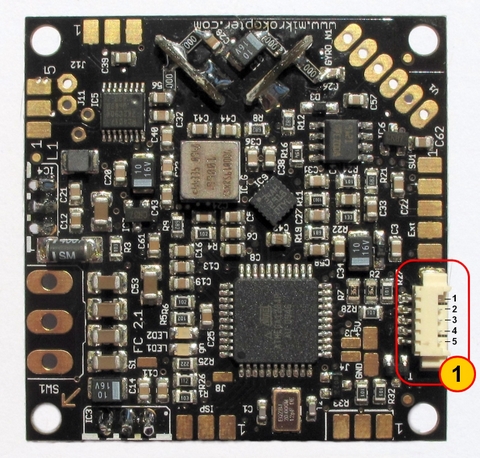
Molex-Connector to connect to power distribution board
1 - Molex Connector
Connections from top to bottom:
1 - +12V
2 - I2C Bus (C)
3 - I2C Bus (D)
4 - + Buzzer
5 -Ground (GND FC and Buzzer)

If you are using this new connection you will be unable to install a power switch for your Flight Controller. The Mikrokopter will then get turned on by connecting your Lipo battery. (All MK with more than 4 engines do that anyways).
== Bottom Side== 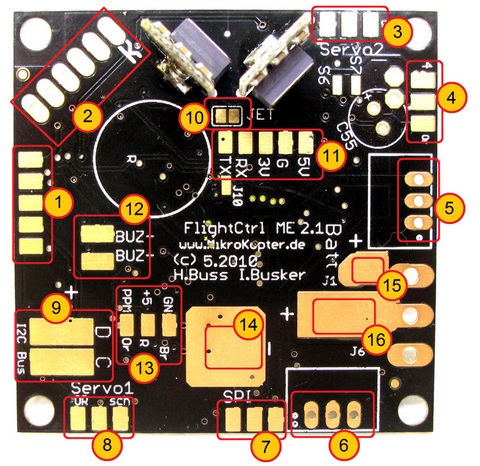
1 - 10pin connector for MK-USB or NaviCtrl connection
2 - Pressure Sensor (cut out of sensor connector points to the right)
3 - 6pin connector for servo 2 and Servo 3
4 - 6pin connector for servo 4 and servo 5
5 - DC/DC voltage regulator 5v Recom for Flight Controller
6 - DC/DC voltage regulator 5v Recom for servos
7 - 6pin connector for NaviCtrl
8 - 6pin connector for servo 1 and switchable J16/J17 connectors
9 - I2C connector (C/D) for BL Controllers
10 - JET (If you are using the Jeti Satellite receiver you will have to bridge these two connectors)
11 - 5pin connector (5V, GND, 3V, RX,TX)
Connection for Jeti receiver:
Connect PPM cable to #13, bridge the 2 connectors on #10 and connect RX
Connection for Spektrum Satellite::
Connect the orange Receiver cable on 3V, black to G and gray to RX
12 - connection for the buzzer (BUZ-/BUZ+)
13 - Connection for PPM receiver (GN-brown, +5V-red, PPM-orange)
14 - Ground (GND) connection for the Flight Controller
15 - Positive (+) connection for the Flight Controller (if a power switch is being used)
16 - Positive (+) connection for the Flight Controller (without a power switch)
Connections

(FC2.1 and FC2.0 are identical except the new Molex Connector)
Connectors SV2
Upper Row (switchable outputs)
Pin1: 100mA switchable output with NON Open Collector for LED's, Programmable with MK Koptertool with J16.
Pin3: +5 Volt
Pin5: 100mA switchable output with NON Open Collector for LED's, Programmable with MK Koptertool with J17.
Lower row: Nick-Servo Output
Pin2: Servo 1 output (for Nick-Servo camera stabilization)(adjustable via MK Koptertool)
Pin4: +5V (only applicable if you installed a Recom on IC3)
Pin6: GND
Hinweis: die Servoausgänge werden erst aktiviert, nachdem die Gyros kalibriert wurden (Gas/Gier-Knüppel so lange in die obere linke Ecke drücken, bis der Summer piepst und die grüne LED erlischt).
Connectors SV3
Upper row: Servo 3
Pin1: Servo 3 output
Pin3: +5V (only applicable if you installed a Recom on IC3)
Pin5: GND
Lower Row: Roll-Servo Output
Pin2: Servo 2 Output (Setting in Koptertool)
Pin4: +5V (only applicable if you installed a Recom on IC3)
Pin6: GND
Connectors SV4
Upper row: Servo 5
Pin1: Servo 5 output
Pin3: +5V (only applicable if you installed a Recom on IC3)
Pin5: GND
Lower Row: Servo 4
Pin2: Servo 4 output
Pin4: +5V (only applicable if you installed a Recom on IC3)
Pin6: GND
Receiver Connection
Standard PPM-Receiver
Examples:
Connection:
- black to "GN" (negative)
- orange to "+5V" (positive)
- orange to "PPM" (data connection)


Spektrum Satellite Receiver
The 3V power connection for the satellite receiver is on the bottom side of the Flight Controller.
Connection:
- black to "g" (negative)
- orange to "3V" (positive)
- gray to "Rx" (data connection)
- do not bridge the 2 JET connectors.


Also see: Spektrum
Jeti Satellite Receiver
The external diode is already integrated into the FC2.1 circuit and therefore will not have to get soldered.
Connection:
- black to "GN" (negative)
- orange to "+5V" (positive)
- orange to "PPM" (data connection)
- bridge the 2 connectors for JET
- separate data connection for down-link data gets connected via "RX" to "D" or the receiver


Also see: JetiDuplex
Wiring Diagram
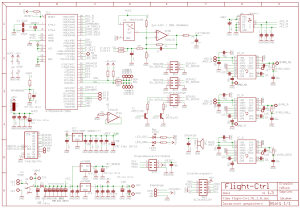
 Die Benutzung der MikroKopter-Software ist nur auf originaler Hardware erlaubt.
Hardware Changes since V2.00
- new controller with double the flash memory (ATMEGA1284P)
- Molex-connector for easy power distribution board connection
- integrated power supply for Spektrum Satellite receiver
- JET connector bridge for easy usage for JETI down-link
- Adjustable resistor for pressure sensor to accommodate 2000-3000 meters in elevation depending on weather
- resistor adjustment for I2C Pull-Ups.
- Protection diode for Buzzer
- new black color
What's included and what has changed compared with V2.0
- Pressure Sensor MPX4115A is included
- 2 power regulators (recom or similar) are included to supply your flight controller and servos with power
- power switch is NOT includes and has to get ordered separately
Other
- the boot loader for FC2.1 is not public domain and can not be read out thanks to our good friends in china.
- under no circumstances is it allowed to program or delete the ISP with Atmel programmers