
|
Größe: 8532
Kommentar:
|
Größe: 8525
Kommentar: 3,3V instead 3,0V
|
| Gelöschter Text ist auf diese Art markiert. | Hinzugefügter Text ist auf diese Art markiert. |
| Zeile 8: | Zeile 8: |
| == Top Side== | == Top Side == |
| Zeile 22: | Zeile 23: |
| == Bottom Side== | == Bottom Side == |
| Zeile 25: | Zeile 26: |
| 1 - 10pin connector for MK-USB or NaviCtrl connection<<BR>> 2 - Pressure Sensor (cut out of sensor connector points to the right)<<BR>> 3 - 6pin connector for servo 2 and Servo 3<<BR>> 4 - 6pin connector for servo 4 and servo 5<<BR>> 5 - DC/DC voltage regulator 5v Recom for Flight Controller<<BR>> 6 - DC/DC voltage regulator 5v Recom for servos<<BR>> 7 - 6pin connector for NaviCtrl<<BR>> 8 - 6pin connector for servo 1 and switchable J16/J17 connectors<<BR>> 9 - I2C connector (C/D) for BL Controllers<<BR>> 10 - JET (If you are using the Jeti Satellite receiver you will have to bridge these two connectors)<<BR>> 11 - 5pin connector (5V, GND, 3V, RX,TX) | 1 - 10pin connector for MK-USB or NaviCtrl connection<<BR>> 2 - Pressure Sensor (cut out of sensor connector points to the right)<<BR>> 3 - 6pin connector for servo 2 and Servo 3<<BR>> 4 - 6pin connector for servo 4 and servo 5<<BR>> 5 - DC/DC voltage regulator 5v Recom for Flight Controller<<BR>> 6 - DC/DC voltage regulator 5v Recom for servos<<BR>> 7 - 6pin connector for NaviCtrl<<BR>> 8 - 6pin connector for servo 1 and switchable J16/J17 connectors<<BR>> 9 - I2C connector (C/D) for BL Controllers<<BR>> 10 - JET (If you are using the Jeti Satellite receiver you will have to bridge these two connectors)<<BR>> 11 - 5pin connector (5V, GND, 3,3V, RX,TX) |
| Zeile 29: | Zeile 30: |
| Zeile 30: | Zeile 32: |
| . Connect the orange Receiver cable on 3V, black to G and gray to RX<<BR>> | . Connect the orange Receiver cable on 3,3V, black to G and gray to RX<<BR>> |
| Zeile 36: | Zeile 38: |
| = Anschlüsse = | = Connections = |
| Zeile 39: | Zeile 41: |
| (bis auf die weisse Molex-Buchse ist die FC2.1 von den Steckanschlüssen identisch mit der FC2.0) | (FC2.1 and FC2.0 are identical except the new Molex Connector) |
| Zeile 41: | Zeile 43: |
| == Anschlüsse SV2 == '''Obere Reihe (Schaltausgänge)''' |
== Connectors SV2 == '''Upper Row (switchable outputs)''' |
| Zeile 44: | Zeile 46: |
| Pin1: 100mA Schaltausgang NPN Open Collector z.B. für LEDs. Im Koptertool [[MK-Parameter/Output|programmierbar]] mit J16. | Pin1: 100mA switchable output with NON Open Collector for LED's, Programmable with MK Koptertool with J16. |
| Zeile 48: | Zeile 50: |
| Pin5: 100mA Schaltausgang NPN Open Collector z.B. für LEDs. Im Koptertool [[MK-Parameter/Output|programmierbar]] mit J17. | Pin5: 100mA switchable output with NON Open Collector for LED's, Programmable with MK Koptertool with J17. |
| Zeile 50: | Zeile 52: |
| '''Untere Reihe: Nick-Servo Ausgang''' | '''Lower row: Nick-Servo Output''' |
| Zeile 52: | Zeile 54: |
| Pin2: Servo1 Ausgang (für Nick-Servo der Kamerastabilisierung) ([[MK-Parameter/Camera|Setting im Koptertool]]) | Pin2: Servo 1 output (for Nick-Servo camera stabilization)(adjustable via MK Koptertool) |
| Zeile 54: | Zeile 56: |
| Pin4: +5 Volt (Recom IC3 muss bestückt werden) | Pin4: +5V (only applicable if you installed a Recom on IC3) |
| Zeile 56: | Zeile 58: |
| Pin6: GND / Minus | Pin6: GND |
| Zeile 58: | Zeile 60: |
| Hinweis: die Servoausgänge werden erst aktiviert, nachdem die Gyros kalibriert wurden (Gas/Gier-Knüppel so lange in die obere linke Ecke drücken, bis der Summer piepst und die grüne LED erlischt). | Attention: the servo outputs get activated after the calibration of the gyros. Push the throttle lever in the upper left corner until you hear the buzzer and the green LED turns off. |
| Zeile 60: | Zeile 62: |
| == Anschlüsse SV3 == '''Obere Reihe (Servo 3)''' |
== Connectors SV3 == '''Upper row: Servo 3''' |
| Zeile 63: | Zeile 65: |
| Pin1: Servo3 Ausgang | Pin1: Servo 3 output |
| Zeile 65: | Zeile 67: |
| Pin3: +5 Volt (Recom IC3 muss bestückt werden) | Pin3: +5V (only applicable if you installed a Recom on IC3) |
| Zeile 67: | Zeile 69: |
| Pin5: GND / Minus | Pin5: GND |
| Zeile 69: | Zeile 71: |
| '''Untere Reihe: Roll-Servo Ausgang''' | '''Lower Row: Roll-Servo Output''' |
| Zeile 71: | Zeile 73: |
| Pin2: Servo2 Ausgang ([[MK-Parameter/Camera|Setting im Koptertool]]) | Pin2: Servo 2 Output ([[MK-Parameter/Camera|Setting in Koptertool]]) |
| Zeile 73: | Zeile 75: |
| Pin4: +5 Volt (Recom IC3 muss bestückt werden) | Pin4: +5V (only applicable if you installed a Recom on IC3) |
| Zeile 75: | Zeile 77: |
| Pin6: GND / Minus | Pin6: GND |
| Zeile 77: | Zeile 79: |
| == Anschlüsse SV4 == '''Obere Reihe (Servo 5)''' |
== Connectors SV4 == '''Upper row: Servo 5''' |
| Zeile 80: | Zeile 82: |
| Pin1: Servo5 Ausgang | Pin1: Servo 5 output |
| Zeile 82: | Zeile 84: |
| Pin3: +5 Volt (Recom IC3 muss bestückt werden) | Pin3: +5V (only applicable if you installed a Recom on IC3) |
| Zeile 84: | Zeile 86: |
| Pin5: GND / Minus | Pin5: GND |
| Zeile 86: | Zeile 88: |
| '''Untere Reihe: (Servo 4)''' | '''Lower Row: Servo 4''' |
| Zeile 88: | Zeile 90: |
| Pin2: Servo5 Ausgang | Pin2: Servo 4 output |
| Zeile 90: | Zeile 92: |
| Pin4: +5 Volt (IC3 muss bestückt werden) | Pin4: +5V (only applicable if you installed a Recom on IC3) |
| Zeile 92: | Zeile 94: |
| Pin6: GND / Minus | Pin6: GND |
| Zeile 94: | Zeile 96: |
| = Empfängeranschlüsse = == Standard PPM-Empfänger == z.B. |
= Receiver Connection = == Standard PPM-Receiver == Examples: |
| Zeile 101: | Zeile 103: |
| Anschluss: | Connection: |
| Zeile 103: | Zeile 105: |
| * Schwarz an "GN" (Minus) * Orange an "+5" (Plus) * Orange an "PPM" (Datenleitung) |
* black to "GN" (negative) * orange to "+5V" (positive) * orange to "PPM" (data connection) |
| Zeile 113: | Zeile 115: |
| == Spektrum Satellitenempfänger == Der 3,0V-Anschluss und der Datenanschluss RxD für diesen Empfänger sind auf der Unterseite vorgesehen. |
== Spektrum Satellite Receiver == The 3,3V power connection for the satellite receiver is on the bottom side of the Flight Controller. |
| Zeile 116: | Zeile 118: |
| Anschluss: | Connection: |
| Zeile 118: | Zeile 120: |
| * Schwarz an "G" (Minus) * Orange an "3V" (Plus) * Grau an "RX" (Datenleitung) * Lötjumper "JET" Offen |
* black to "g" (negative) * orange to "3,3V" (positive) * gray to "Rx" (data connection) * do not bridge the 2 JET connectors. |
| Zeile 127: | Zeile 129: |
| Siehe auch: [[Spektrum]] | Also see: [[Spektrum]] |
| Zeile 129: | Zeile 131: |
| == Jeti Satellitenempfänger == Die externe Diode ist ab der FC-Version 2.1 bereits integriert, muss hier also nicht mehr von außen angelötet werden. |
== Jeti Satellite Receiver == The external diode is already integrated into the FC2.1 circuit and therefore will not have to get soldered. |
| Zeile 132: | Zeile 134: |
| Anschluss: | Connection: |
| Zeile 134: | Zeile 136: |
| * Schwarz an "GN" (Minus) * Orange an "+5" (Plus) * Orange an "PPM" (PPM-Datenleitung) * Lötjumper "JET" gebrückt * Separate Datenleitung (Jeti-Rückkanal) von "RX" an "D" des Jeti-Empfängers (äußerer Anschluss) |
* black to "GN" (negative) * orange to "+5V" (positive) * orange to "PPM" (data connection) * bridge the 2 connectors for JET * separate data connection for down-link data gets connected via "RX" to "D" or the receiver |
| Zeile 144: | Zeile 146: |
| Siehe auch: JetiDuplex | Also see: JetiDuplex |
| Zeile 146: | Zeile 148: |
| = Schaltplan = | = Wiring Diagram = |
| Zeile 149: | Zeile 151: |
| /!\ Die Benutzung der MikroKopter-Software ist nur auf originaler Hardware erlaubt. | /!\ The usage of MikroKopter Software is only permitted on original MikroKopter hardware. |
| Zeile 151: | Zeile 153: |
| = Hardware-Änderungen zur Version V2.0 = * Controller mit doppelt so viel Flash-Speicher (ATMEGA1284P) * Molex-Stecker für einfachen Anschluss an die Stromverteilerplatinen * eigener Spannungsregler für z.B. Spektrum Satelliten Empfänger * Löt-Jumper für die Verwendung vom Jeti Rückkanal (für die JetiBox) * Widerstandsanpassung für den Luftdrucksensor. Messbereich jetzt (je nach Wetterlage): bis ca. 2000-3000m * Widerstandsanpassung I2C Pull-Ups. * Schutzdiode in SPEAKER Ausgang eingefügt. * Farbe jetzt schwarz |
= Hardware Changes since V2.00 = * new controller with double the flash memory (ATMEGA1284P) * Molex-connector for easy power distribution board connection * integrated power supply for Spektrum Satellite receiver * JET connector bridge for easy usage for JETI down-link * Adjustable resistor for pressure sensor to accommodate 2000-3000 meters in elevation depending on weather * resistor adjustment for I2C Pull-Ups. * Protection diode for Buzzer * new black color |
| Zeile 161: | Zeile 163: |
| == Änderung Lieferumfang der V2.1 (im Vergleich zur V2.0) == * Luftdrucksensor MPX4115A enthalten * jetzt 2 Spannungsregler (z.B. RECOM ö.ä.) enthalten (für FlightCtrl - Versorgung & Servo-Versorgung) * Schalter ist nicht mehr enthalten und muss bei Bedarf separat bestellt werden |
== What's included and what has changed compared with V2.0 == * Pressure Sensor MPX4115A is included * 2 power regulators (recom or similar) are included to supply your flight controller and servos with power * power switch is NOT includes and has to get ordered separately |
| Zeile 166: | Zeile 168: |
| = Sonstiges = * der Bootloader der FC2.1 ist nicht öffentlich und kann nicht ausgelesen werden - das haben wir den Chinesen zu verdanken * auf keinen Fall darf per ISP (mit Atmel-Programmern & co) das Programm neu eingespielt oder gelöscht werden |
= Other = * the boot loader for FC2.1 is not public domain and can not be read out thanks to our good friends in china. * a AtMega1284 Prozessor with programmed bootloader is available [[https://www.mikrocontroller.com/index.php?main_page=product_info&cPath=68&products_id=513|here]] * under no circumstances is it allowed to program or delete the ISP with Atmel programmers |
 Page in
  Page en
 siehe auch: FlightCtrl_ME_2_0
Inhaltsverzeichnis
Flight Ctrl V2.1
Top Side
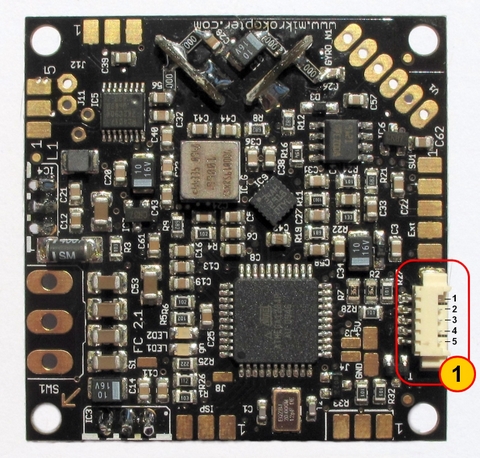
Molex-Connector to connect to power distribution board
1 - Molex Connector
Connections from top to bottom:
1 - +12V
2 - I2C Bus (C)
3 - I2C Bus (D)
4 - + Buzzer
5 -Ground (GND FC and Buzzer)

If you are using this new connection you will be unable to install a power switch for your Flight Controller. The Mikrokopter will then get turned on by connecting your Lipo battery. (All MK with more than 4 engines do that anyways).
Bottom Side
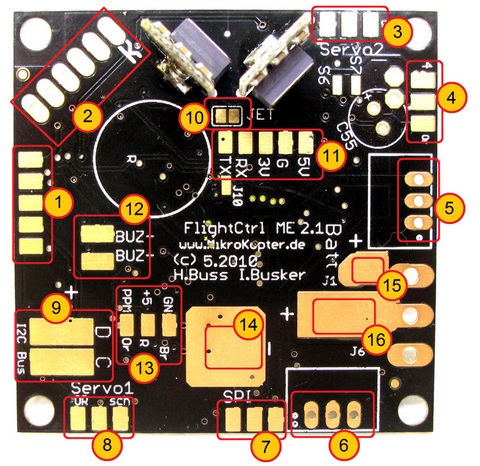
1 - 10pin connector for MK-USB or NaviCtrl connection
2 - Pressure Sensor (cut out of sensor connector points to the right)
3 - 6pin connector for servo 2 and Servo 3
4 - 6pin connector for servo 4 and servo 5
5 - DC/DC voltage regulator 5v Recom for Flight Controller
6 - DC/DC voltage regulator 5v Recom for servos
7 - 6pin connector for NaviCtrl
8 - 6pin connector for servo 1 and switchable J16/J17 connectors
9 - I2C connector (C/D) for BL Controllers
10 - JET (If you are using the Jeti Satellite receiver you will have to bridge these two connectors)
11 - 5pin connector (5V, GND, 3,3V, RX,TX)
Connection for Jeti receiver:
Connect PPM cable to #13, bridge the 2 connectors on #10 and connect RX
Connection for Spektrum Satellite::
Connect the orange Receiver cable on 3,3V, black to G and gray to RX
12 - connection for the buzzer (BUZ-/BUZ+)
13 - Connection for PPM receiver (GN-brown, +5V-red, PPM-orange)
14 - Ground (GND) connection for the Flight Controller
15 - Positive (+) connection for the Flight Controller (if a power switch is being used)
16 - Positive (+) connection for the Flight Controller (without a power switch)
Connections

(FC2.1 and FC2.0 are identical except the new Molex Connector)
Connectors SV2
Upper Row (switchable outputs)
Pin1: 100mA switchable output with NON Open Collector for LED's, Programmable with MK Koptertool with J16.
Pin3: +5 Volt
Pin5: 100mA switchable output with NON Open Collector for LED's, Programmable with MK Koptertool with J17.
Lower row: Nick-Servo Output
Pin2: Servo 1 output (for Nick-Servo camera stabilization)(adjustable via MK Koptertool)
Pin4: +5V (only applicable if you installed a Recom on IC3)
Pin6: GND
Attention: the servo outputs get activated after the calibration of the gyros. Push the throttle lever in the upper left corner until you hear the buzzer and the green LED turns off.
Connectors SV3
Upper row: Servo 3
Pin1: Servo 3 output
Pin3: +5V (only applicable if you installed a Recom on IC3)
Pin5: GND
Lower Row: Roll-Servo Output
Pin2: Servo 2 Output (Setting in Koptertool)
Pin4: +5V (only applicable if you installed a Recom on IC3)
Pin6: GND
Connectors SV4
Upper row: Servo 5
Pin1: Servo 5 output
Pin3: +5V (only applicable if you installed a Recom on IC3)
Pin5: GND
Lower Row: Servo 4
Pin2: Servo 4 output
Pin4: +5V (only applicable if you installed a Recom on IC3)
Pin6: GND
Receiver Connection
Standard PPM-Receiver
Examples:
Connection:
- black to "GN" (negative)
- orange to "+5V" (positive)
- orange to "PPM" (data connection)


Spektrum Satellite Receiver
The 3,3V power connection for the satellite receiver is on the bottom side of the Flight Controller.
Connection:
- black to "g" (negative)
- orange to "3,3V" (positive)
- gray to "Rx" (data connection)
- do not bridge the 2 JET connectors.


Also see: Spektrum
Jeti Satellite Receiver
The external diode is already integrated into the FC2.1 circuit and therefore will not have to get soldered.
Connection:
- black to "GN" (negative)
- orange to "+5V" (positive)
- orange to "PPM" (data connection)
- bridge the 2 connectors for JET
- separate data connection for down-link data gets connected via "RX" to "D" or the receiver


Also see: JetiDuplex
Wiring Diagram
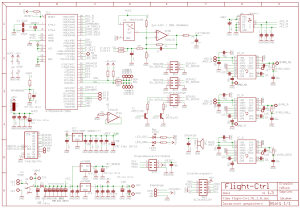
 The usage of MikroKopter Software is only permitted on original MikroKopter hardware.
Hardware Changes since V2.00
- new controller with double the flash memory (ATMEGA1284P)
- Molex-connector for easy power distribution board connection
- integrated power supply for Spektrum Satellite receiver
- JET connector bridge for easy usage for JETI down-link
- Adjustable resistor for pressure sensor to accommodate 2000-3000 meters in elevation depending on weather
- resistor adjustment for I2C Pull-Ups.
- Protection diode for Buzzer
- new black color
What's included and what has changed compared with V2.0
- Pressure Sensor MPX4115A is included
- 2 power regulators (recom or similar) are included to supply your flight controller and servos with power
- power switch is NOT includes and has to get ordered separately
Other
- the boot loader for FC2.1 is not public domain and can not be read out thanks to our good friends in china.
a AtMega1284 Prozessor with programmed bootloader is available here
- under no circumstances is it allowed to program or delete the ISP with Atmel programmers